Buffer vs. Later: Which Instagram Scheduler Is Right for You in 2026?
 Heropost Team·Apr 10, 2026·8 min read
Introduction
You have narrowed your Instagram scheduling tool search down to two of the most popular options: Buffer and Later. Both are well-regarded, both have free plans, and both support Instagram. So which one should you choose?
The answer depends on what you actually need. Buffer and Later serve different use cases well—and choosing the wrong one can mean paying for features you do not need or missing functionality that would make your workflow significantly easier.
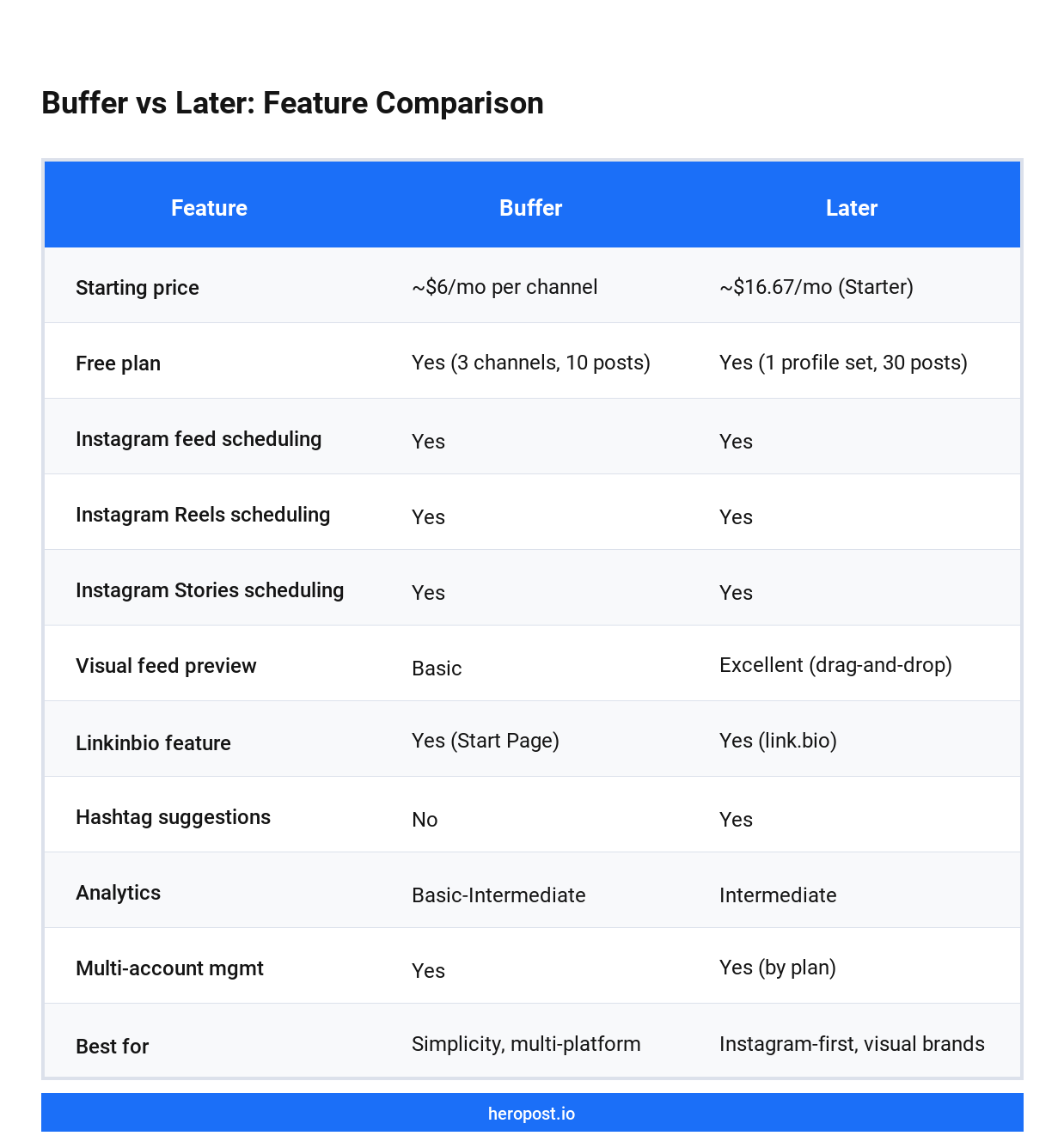
This guide breaks down Buffer vs. Later across the dimensions that matter most: pricing, Instagram-specific features, ease of use, analytics, and which type of user each tool is genuinely best for. We also cover where Heropost fits if you need something more powerful than both.
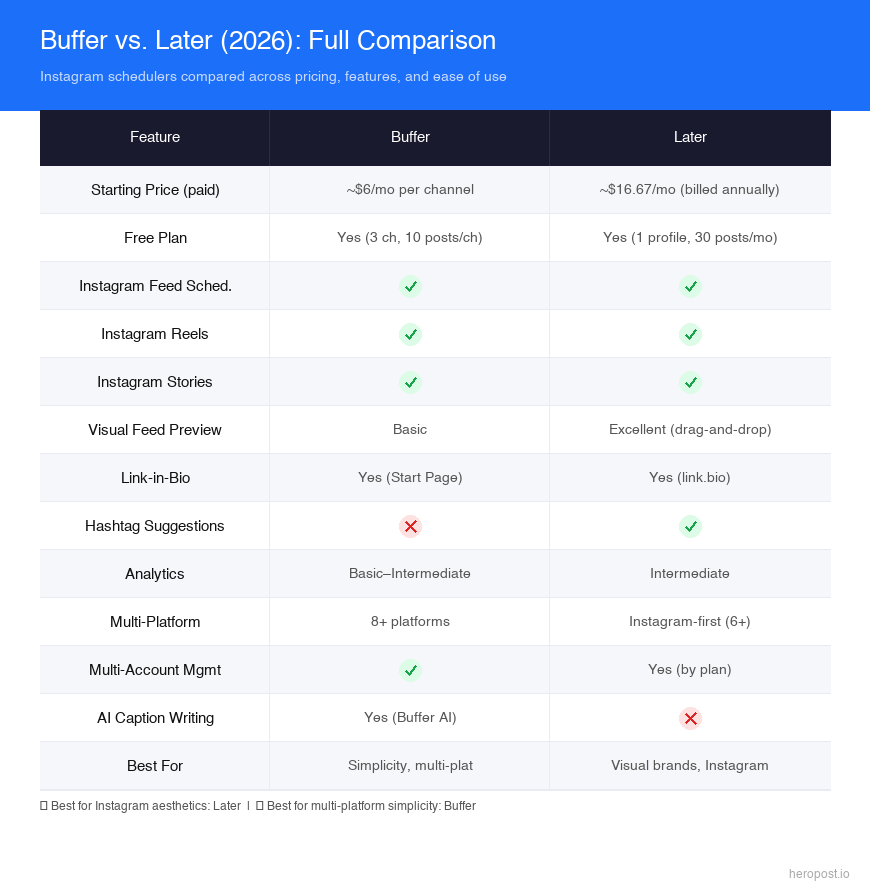
Buffer vs. Later: Quick Overview
| Feature | Buffer | Later |
|---|---|---|
| Starting price (paid) | ~$6/mo per channel | ~$16.67/mo (Starter, billed annually) |
| Free plan | Yes (3 channels, 10 posts/channel) | Yes (1 set of social profiles, 30 posts/mo) |
| Instagram feed scheduling | Yes | Yes |
| Instagram Reels scheduling | Yes | Yes |
| Instagram Stories scheduling | Yes | Yes |
| Visual feed preview | Basic | Excellent (drag-and-drop grid) |
| Linkinbio feature | Yes (Start Page) | Yes (link.bio) |
| Hashtag suggestions | No | Yes |
| Analytics | Basic–Intermediate | Intermediate |
| Multi-account management | Yes | Yes (by plan) |
| Best for | Simplicity, multi-platform | Instagram-first, visual brands |
Buffer: The Simplicity Champion
Buffer has been one of the most popular social media scheduling tools since 2010. Its defining characteristic is simplicity: Buffer does one thing (schedule social posts) and does it very, very cleanly.
What Buffer does best:
Ease of use. Buffer has one of the most intuitive interfaces in the scheduling tool category. Scheduling a post takes about 30 seconds. There is no steep learning curve, no complex onboarding, and no feature bloat to navigate. If you are just getting started with social media scheduling, Buffer will have you up and running faster than almost any other tool.
Multi-platform breadth. While Later is primarily Instagram-focused, Buffer supports 8+ social platforms including Instagram, Facebook, Twitter/X, LinkedIn, Pinterest, TikTok, and YouTube. If you are managing multiple platforms and want a single tool, Buffer is the better choice.
Affordable pricing. Buffer’s Essentials plan starts at around $6/month per channel, billed annually. For creators managing 3-4 channels, the total cost is $18-24/month—significantly cheaper than most competitors at that feature level.
Genuine free plan. Buffer’s free tier allows 3 social channels and 10 scheduled posts per channel at a time. For someone just starting out or managing a very light posting schedule, the free plan is genuinely functional.
Where Buffer falls short:
Visual feed planning. Buffer’s feed preview is basic. You can see how individual posts will look, but you do not get the drag-and-drop visual grid planning that Later is famous for. If your brand’s aesthetic cohesion across your Instagram grid matters, this is a meaningful limitation.
Instagram-specific features. Buffer is a generalist tool. It does not have Instagram-specific features like hashtag suggestions, best time to post recommendations based on follower activity, or a robust Linkinbio tool with analytics.
Analytics depth. Buffer’s analytics are decent but not deep. You get engagement metrics and basic performance data, but competitor analysis, follower growth tracking, and detailed hashtag analytics require a higher-tier plan.
Who should use Buffer?
Buffer is ideal for:
– Solo creators or small businesses managing 2-4 platforms and wanting one simple, affordable tool
– Marketers who want to get scheduling done quickly without learning a complex tool
– Brands where Instagram is one of several channels (not the primary focus)
– Anyone who values simplicity and low cost over feature richness
Later: The Instagram-First Power Tool
Later launched in 2014 with a specific focus: making Instagram content planning visual, intuitive, and strategic. While it has expanded to support other platforms, Instagram remains Later’s strongest suit.
What Later does best:
Visual feed planning. Later’s drag-and-drop visual calendar is genuinely best-in-class for Instagram. You can see exactly how your entire Instagram grid will look before any post goes live—rearrange posts, preview the aesthetic, and ensure your feed tells a cohesive visual story. For brands with a strong visual identity, this feature alone is worth the price.
Instagram-specific features. Later is built around Instagram in a way Buffer simply is not:
– Hashtag suggestions and analytics to find the best tags for your content
– Best time to post recommendations based on your own follower engagement data
– Stories scheduling with link stickers and interactive element previews
– Reels scheduling with cover image selection
– User-generated content (UGC) search and repost tools
Linkinbio tool. Later’s link.bio is one of the most fully featured Linkinbio tools on the market—more capable than Buffer’s Start Page. You can build a mini landing page, track clicks per link, and connect individual posts to specific landing page URLs.
Hashtag analytics. Later provides data on which hashtags are driving your reach and engagement. This is a feature Buffer does not offer, and it is valuable for Instagram growth strategy.
Where Later falls short:
Price. Later’s paid plans start at approximately $16.67/month (Starter, billed annually) for 1 set of social profiles. At the Growth tier (needed for full analytics and multi-account features), pricing climbs to $33.33+/month. This is significantly more than Buffer at comparable account quantities.
Multi-platform breadth. Later supports Instagram, Facebook, Twitter/X, LinkedIn, TikTok, and Pinterest—but its non-Instagram features are less polished than its core Instagram offering. If you need excellent multi-platform support, Later is weaker than Buffer in that dimension.
Free plan limitations. Later’s free plan allows only 30 posts per month across 1 set of social profiles. For anyone posting more than once per day, this runs out quickly.
Who should use Later?
Later is ideal for:
– Instagram-first brands where the visual aesthetic of the feed is important
– Creators who rely on hashtag strategy for Instagram growth
– E-commerce or visual brands (fashion, food, lifestyle, beauty) where grid planning matters
– Businesses running a single set of social accounts on a moderate budget
Buffer vs. Later: The Head-to-Head Verdict
Price winner: Buffer. For equivalent feature levels and account quantities, Buffer is cheaper—often significantly so.
Instagram visual planning winner: Later. The drag-and-drop grid preview is unmatched. If you care about your Instagram feed aesthetic, Later wins clearly.
Multi-platform winner: Buffer. Buffer is built as a multi-platform tool. Later is built as an Instagram tool that also supports other platforms.
Analytics winner: Later. Later’s hashtag analytics and Instagram-specific insights give it an edge over Buffer’s more general analytics.
Ease of use winner: Buffer. Simpler interface, faster scheduling workflow.
Linkinbio winner: Later. Later’s link.bio is more robust than Buffer’s Start Page.
When You Need More Than Either: Heropost
Both Buffer and Later have meaningful limitations that become apparent as your social media operation scales up:
- Neither tool is built for agency multi-account management at scale
- Both have limited team collaboration features compared to professional tools
- Neither offers the comprehensive cross-platform analytics that growing brands and agencies need
If you are managing more than 5 accounts, working with a team, or need agency-grade workflow management alongside your scheduling, Heropost is worth evaluating. Heropost delivers:
- True multi-account management from a single dashboard (built for agencies and growing teams)
- Team collaboration with approval workflows
- Comprehensive analytics across all platforms in one view
- Competitive pricing for the feature set offered
For small creators and solo businesses, Buffer or Later may be all you need. For growing teams and agencies, Heropost bridges the gap between the simplicity of Buffer/Later and the enterprise cost of tools like Hootsuite.
Frequently Asked Questions
Is Buffer or Later better for Instagram Reels?
Both support Instagram Reels scheduling. Later has a slight edge with its Reels-specific features (cover image selection, visual feed integration). For Reels scheduling as part of a multi-platform workflow, Buffer is more convenient.
Does Later have a free plan?
Yes. Later’s free plan includes 1 set of social profiles and 30 posts per month total. It is more limited than Buffer’s free plan (which offers 10 scheduled posts per channel).
Can I try both Buffer and Later before deciding?
Yes. Both offer free plans that you can use indefinitely—no credit card required. Buffer’s free plan allows 3 channels with 10 posts each; Later’s free plan is 30 posts/month. Test both with your actual content and workflow before committing to a paid plan.
Which tool is better for a small business with multiple social platforms?
Buffer. Its multi-platform breadth, simple interface, and lower price point make it the better fit for small businesses managing Instagram, Facebook, LinkedIn, and other channels together.
Does Buffer or Later support Instagram Stories scheduling?
Both support Instagram Stories scheduling. Later’s Stories scheduling is slightly more feature-rich (link sticker previews, sticker placement), but Buffer’s Stories scheduling is fully functional for most use cases.
Conclusion
Choose Buffer if:
– You manage multiple social platforms (not just Instagram)
– Price is your primary concern
– Simplicity and speed of scheduling matter most
– You do not need advanced visual grid planning
Choose Later if:
– Instagram is your primary (or only) platform
– Your brand’s visual aesthetic and feed cohesion are important
– You rely on hashtag research and analytics for Instagram growth
– You want the best Linkinbio tool in the category
Choose Heropost if:
– You are managing 5+ accounts or client accounts
– You need team collaboration and approval workflows
– You want agency-grade features without enterprise pricing
All three offer free trials or plans—test before you commit. Visit heropost.io to see how Heropost compares.
Schedule a month of content in one afternoon
Every network, one calendar, free to start.