Introduction
The content calendar is the most recommended and most abandoned tool in social media marketing. Every article on the topic tells you to plan ahead, batch your content, and use a spreadsheet or scheduling tool. Few of them address the reason most content calendars fail: they are built for an idealised version of how marketing teams work, not how they actually work.
This guide takes a different approach. Instead of presenting a perfect system, it starts with the most common failure modes — and builds a content calendar methodology around surviving them.
Why Most Content Calendars Get Abandoned
They are too rigid. A content calendar that specifies the exact post, format, and caption for every day three months in advance sounds thorough. In practice, it breaks the moment something newsworthy happens, a campaign shifts, or a piece of content simply is not ready on the planned day. When the calendar breaks, it often gets abandoned entirely rather than adapted.
They are built around perfect weeks. Content calendars often assume you have the same amount of capacity every week — regular team meetings, consistent content production, steady inspiration. Real weeks do not work like this. Illness, urgent client work, creative blocks, and platform algorithm changes all disrupt the ideal rhythm.
They try to do too much. A content calendar that tracks post type, caption, hashtags, visual assets, links, approval status, scheduled time, and engagement notes for every platform, every day, for a quarter ahead, is a full-time job to maintain. Most people have actual full-time jobs.
They are disconnected from the work. If the calendar lives in a spreadsheet but the content creation happens somewhere else and the scheduling happens in a third tool, the friction of keeping everything synced usually wins over the good intention of maintaining the calendar.
The Minimal Viable Content Calendar
Before building anything complex, start with the simplest version that keeps you consistent: a rolling two-week view with three pieces of information per post — what it is, which platform, and when it goes out.
That is it. No captions in the calendar, no visual notes, no approval columns. Just a reliable map of what is going live and when.
Once you have been maintaining this for a month without abandoning it, add the next layer. Complexity earns its place by being used, not by looking thorough.
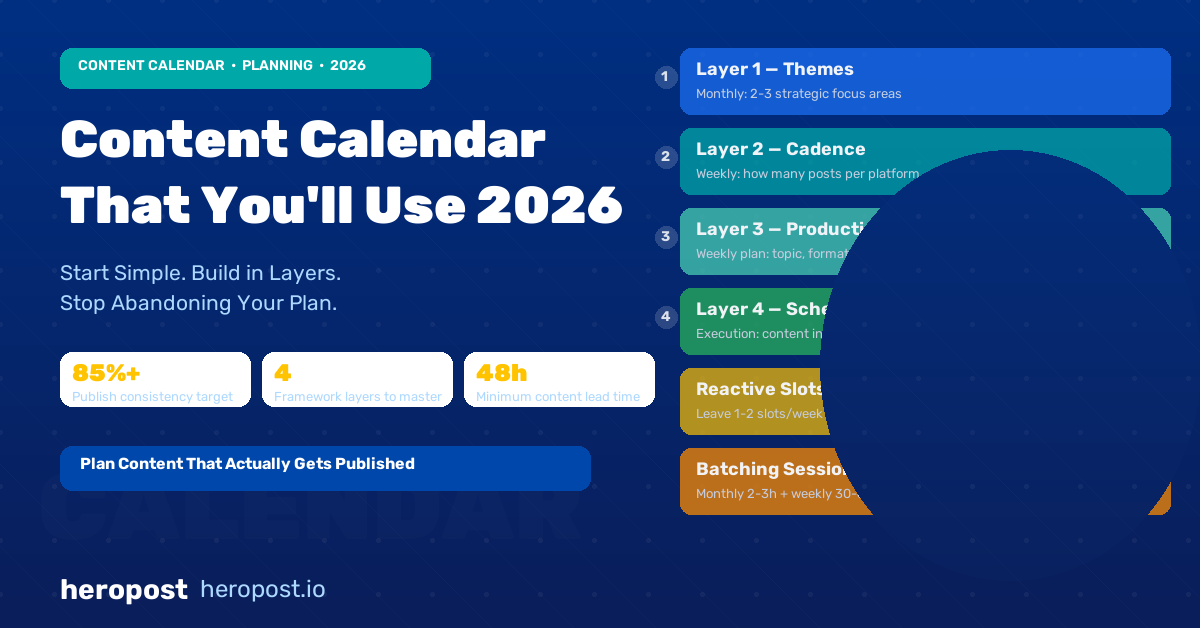
The Four-Layer Content Calendar Framework
For teams ready to build something more robust, a layered approach works better than a single all-in-one system:
Layer 1: The Themes Layer (Monthly)
At the start of each month, decide 2-3 content themes or focus areas. These are not specific posts — they are the strategic context for the month’s content. Examples: “Launch month for Product X,” “Customer story focus,” “Engagement-building — more questions and polls,” “Preparing for the trade show.”
Themes inform all the content decisions in the month without locking you into specific posts. When something unexpected happens (news, a viral trend, an urgent customer story), you adapt the posts within the theme rather than throwing the calendar out.
Layer 2: The Cadence Layer (Weekly)
Decide how many posts per platform per week and what general types of content you publish. This is your rhythm, not your recipe. For example: Instagram — 4 posts per week (2 educational, 1 product, 1 community or UGC). LinkedIn — 3 posts per week (2 thought leadership, 1 company update).
Your weekly cadence defines your commitments. Once you have set it, the question stops being “should I post today?” and becomes “what do I post today?”
Layer 3: The Production Layer (Weekly planning)
At the start of each week (or the Friday before), plan the specific posts for the coming week: topic, format (Reel, carousel, static, Story), and rough caption direction. At this stage, you are not writing captions — you are making decisions so that when you sit down to create, you are executing, not deciding.
The production layer is where most calendars live. It gives you enough lead time to create content intentionally without trying to plan so far ahead that circumstances change before you publish.
Layer 4: The Scheduling Layer (Execution)
Once content is created and approved, it goes into your scheduling tool. The scheduling layer is not a planning tool — it is an execution confirmation. When something is in your scheduler, it is done.
Building Your Content Mix
A sustainable content calendar requires variety. Posting the same type of content in the same format week after week produces diminishing returns — audiences disengage when they can predict your feed exactly.
A useful baseline content mix for most brands:
| Content Type | % of Posts | Purpose |
|---|---|---|
| Educational / value | 35-40% | Build expertise and audience trust |
| Product / service | 20-25% | Drive awareness and conversions |
| Community / engagement | 20-25% | Build relationships and gather feedback |
| Behind-the-scenes / culture | 10-15% | Humanise the brand |
| UGC / testimonials | 5-10% | Social proof |
Adjust these ratios based on your specific goals and what your audience responds to. Track which content categories drive the most engagement and reach — over time, let data shift your mix rather than theory.
Planning for Reactive Content
One of the biggest mistakes in content calendar planning is treating reactive content — responding to news, trends, and moments — as a disruption to the plan rather than a planned category.
Reserve capacity for reactive content. In practice, this means leaving one or two scheduling slots per week intentionally unfilled, or planning them as “wildcard” slots that can be used for planned content or filled reactively if something relevant comes up.
This keeps your calendar viable when something happens that demands a response, without turning reactive posting into a frenzy that derails your planned content.
Batching Content for Consistency
Batching — creating multiple pieces of content in a single session — is the single most effective way to maintain posting consistency without burning out on daily content creation.
A batching workflow that works:
Monthly batch session (2-3 hours): Set the themes for the month, decide the content mix, identify any campaigns or launches that need content, and create the first two weeks’ worth of content.
Weekly refresh (30-60 minutes): Review performance from the previous week, adjust the upcoming week’s content based on what worked, create any content not completed in the monthly batch, and schedule the week ahead.
Daily check (10-15 minutes): Respond to comments and DMs from the previous day, check for any emerging trends or news worth responding to, and confirm the day’s scheduled content looks right.
This rhythm keeps content production from becoming a daily emergency while maintaining the freshness and responsiveness that makes social media feel social.
Content Calendar Tools
The right tool is the one you will use. In order of complexity:
Simple start: A shared Google Sheet or Notion database with columns for Date, Platform, Post Type, Topic, Status, and Link to Asset. Works perfectly for solo creators and small teams. Free, flexible, no learning curve.
Scheduling-integrated: Heropost, Buffer, Later, or Hootsuite all have calendar views integrated with their scheduling tools. Content planned in the calendar can move directly to scheduling with no copy-paste friction. Best for teams that want to plan and schedule in the same place.
Full content management: Tools like CoSchedule or Airtable with custom workflows support full editorial processes — content briefs, writing, design reviews, approval chains, and scheduling. Best for larger teams with complex approval requirements.
Measuring Calendar Effectiveness
The goal of a content calendar is consistent, strategic publishing. Measure whether it is working by tracking:
- Publishing consistency: What % of planned posts actually went live on the planned day? (Target: 85%+)
- Content mix adherence: Is your actual content mix matching your intended mix?
- Lead time: Are you creating content with at least 48-72 hours of lead time, or is everything last-minute?
- Team stress: Is the content calendar reducing or increasing production stress? (If the latter, it needs simplifying)
Conclusion
A good content calendar is a planning tool, not a content trap. It should give you clarity, reduce daily decision fatigue, and make consistent publishing feel manageable — not create a system so complex it collapses under its own weight.
Start simple. Use what you actually maintain. Add complexity only when the simpler version has proven itself.
Heropost’s content calendar and scheduling tools let you plan, create, and publish across all major platforms from one place — so your calendar and your scheduler are always in sync. Start your free trial at heropost.io.